No Screen Saver
Portable mouse jiggler app.

No Screen Saver is a small utility for Microsoft® Windows® that prevents your screensaver from locking your screen, and it does not allow your OS to enter the idle state.
It is small, portable, and runs on any Microsoft® Windows® OS.
If you’ve ever had to deliver a presentation or used a laptop to take notes during a class or lecture, then you’ve probably had the experience of having your screen saver kick in and lock you out, forcing you to input your password while possibly losing the pace quickly. Lock out this prickly problem with No Screen Saver. This application stops your computer from locking you out and disrupting important events.
Have you ever had a room full of people in a conference room watching a vendor presentation via a web conference…when your screen saver kicks in, your computer locks, and you have to scramble to enter your password?
“No Screen Saver” was designed to avoid such a problem.
By simulating this user action, it prevents your system's screensaver from starting and prevents the screen from locking. Perfect for presentations or when watching a movie on your computer. It also prevents your system from entering the idle state, making it look as if you were still at your computer even after you have been long gone. Can I still use my mouse when this utility is running? Yes, absolutely, this software is unobtrusive; you can still use your computer while it is running.
It is a small "Green" (and portable) utility that runs on any Windows computer.
How to use
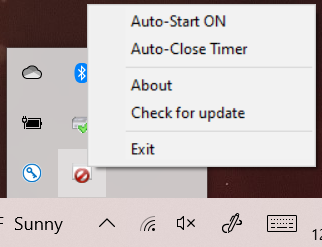
“No Screen Saver” works by automatically moving the mouse cursor very slightly every minute.
By simulating this user action, it prevents your system's screensaver from starting.
It also prevents your system from entering the idle state, making it look as if you were still at your computer even after you have been long gone.
Once you have downloaded the file to a location of your choice, simply run the executable, no installation is needed.
Can I still use my mouse when this utility is running?
Yes, absolutely, this software is unobtrusive; you can still use your computer while it is running.
What's new in version 2.0?
- Now moves the mouse every 10 seconds.
- We have also added an auto-update capability,
- an auto-stop timer to stop the application after a given amount of time,
- as well as an auto-start capability to automatically launch the application every time you reboot your system.
